Recipe Organization Ideas: Never Lose Your Favorite Recipes Again
You've made that incredible chicken recipe three times, but can you find it now? Is it in that magazine pile? Saved on your phone? Bookmarked somewhere? Written on a random sticky note in the junk drawer?
If your recipes are scattered across Pinterest boards, cookbooks, magazine clippings, family cards, and random websites, you're not alone. But this chaos costs time, creates frustration, and prevents you from cooking the meals you love.
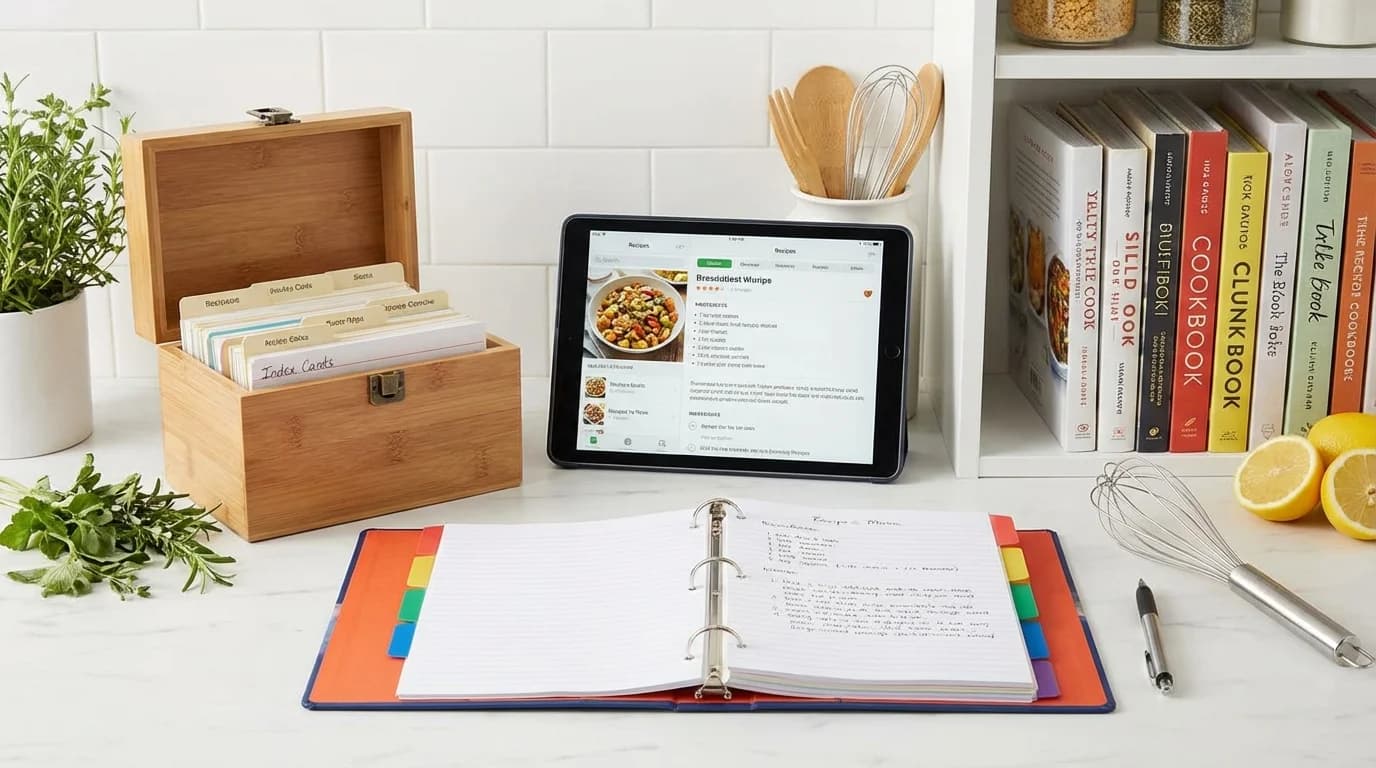
This comprehensive guide provides practical recipe organization systems—digital, physical, and hybrid—so you'll always find the recipe you want, exactly when you want it.
Why Recipe Organization Matters
The Real Cost of Disorganization:
Time wasted:
- 10-15 minutes searching for "that one recipe"
- Re-searching websites you've used before
- Scrolling through hundreds of Pinterest pins
Money wasted:
- Buying cookbooks for single recipes
- Duplicate purchases of same magazine
- Ordering takeout while you search
Frustration:
- Unable to remake loved dishes
- Missing family recipe cards
- Lost handwritten notes from grandma
Missed opportunities:
- Don't try new recipes (can't find them again)
- Forget about great recipes you've saved
- Can't share recipes with family
Benefits of Organization:
- Find any recipe in under 30 seconds
- Plan meals confidently
- Share family recipes easily
- Know your collection at a glance
- Try new recipes without fear of losing them
- Preserve family culinary history
Assess Your Recipe Collection
Step 1: Gather Everything
Collect all recipes from:
- Cookbooks (note favorites)
- Magazine clippings
- Recipe cards
- Handwritten notes
- Printed pages
- Pinterest boards
- Bookmarked websites
- Apps
- Emails
- Photos on phone
Set aside 2-3 hours for this process.
Step 2: Sort and Purge
Ask for each recipe:
- Have I made this? (If no: Will I realistically make it?)
- Did I/would I make it again?
- Is it better than other versions I have?
- Does it fit my current dietary needs?
- Is the source accessible? (No paywalls, broken links)
Create three piles:
- Keep: Will definitely use
- Maybe: Good but uncertain
- Discard: Won't make, didn't work, duplicates
Be ruthless: Most people keep 30-40% of collected recipes
Step 3: Categorize
Common category systems:
By meal type:
- Breakfast
- Lunch
- Dinner
- Snacks
- Desserts
- Drinks
By main ingredient:
- Chicken
- Beef
- Fish
- Vegetables
- Pasta
- Eggs
By cuisine:
- Italian
- Mexican
- Asian
- American
- Mediterranean
- Indian
By cooking method:
- Slow cooker
- Instant Pot
- One-pot
- Baking
- Grilling
- No-cook
By occasion:
- Weeknight dinners
- Entertaining
- Holidays
- Meal prep
- Budget meals
- Quick meals (under 30 min)
Pro tip: Choose ONE primary system, use tags for secondary categorization.
Digital Recipe Organization Systems
Option 1: Recipe Apps
Paprika (One-time $4.99)
Pros:
- Recipe clipper browser extension
- Saves from any website
- Removes ads and life stories
- Meal planning calendar
- Auto-generated grocery lists
- Cloud sync across devices
Cons:
- One-time cost per platform
- Learning curve
Best for: Tech-savvy cooks, web recipe users, meal planners
Pepperplate (Free)
Pros:
- Free for all features
- Recipe clipper
- Meal planning
- Grocery lists
- Web and app access
Cons:
- Interface not as polished
- Some bugs reported
Best for: Budget-conscious, multi-device users
Mealime (Free, premium $2.99/month)
Pros:
- Built-in recipes with photos
- Meal planning focused
- Customizable preferences
- Auto grocery lists
Cons:
- Limited ability to add personal recipes (free version)
- Focused on their recipes, not collecting yours
Best for: Meal planning beginners, need recipe ideas
BigOven (Free, premium $2.99/month)
Pros:
- Huge user community
- Share recipes
- Use up ingredients feature
- Free version robust
Cons:
- Ads in free version
- Interface can be overwhelming
Best for: Recipe sharing, community features
Option 2: Note-Taking Apps
OneNote (Free with Microsoft account)
Pros:
- Completely free
- Organize by notebooks and sections
- Add photos, PDFs, links
- Sync across devices
- Handwriting support (tablets)
Cons:
- Not recipe-specific (no auto-grocery lists)
- Requires manual formatting
Best for: Microsoft users, free option, flexible organization
Evernote (Free, premium $7.99/month)
Pros:
- Powerful organization
- Tag system
- Web clipper
- Search within images
- Free version sufficient for many
Cons:
- Free version limits devices
- Not recipe-specific features
Best for: Already Evernote users, heavy taggers
Notion (Free for personal use)
Pros:
- Extremely customizable
- Database views
- Embed videos and images
- Share with family
- Beautiful templates available
Cons:
- Steep learning curve
- Overkill for simple needs
Best for: Power users, database lovers, customization fans
Option 3: Cloud Storage (Google Drive, Dropbox)
Pros:
- Free for basic storage
- Accessible anywhere
- Easy sharing
- Organize in folders
- Store PDFs, images, documents
Cons:
- Manual organization
- No recipe-specific features
- Can become messy quickly
Best for: Already using cloud storage, simple needs
How to implement:
- Create main "Recipes" folder
- Create subfolders by category
- Save recipes as PDFs or images
- Use clear naming convention: "Chicken-Tikka-Masala.pdf"
- Consider Google Drive searchability
Option 4: Pinterest (Free)
Pros:
- Visual browsing
- Easy saving
- Discover new recipes
- Organize with boards
- Share boards
Cons:
- Links can break
- Cluttered with ads and pop-ups
- Must be online
- Not for personal/family recipes
Best for: Recipe discovery, visual organization, sharing boards
Organization tips:
- Create specific boards (not just "Recipes")
- Name boards clearly: "30-Minute Dinners," "Keto Desserts"
- Pin to multiple relevant boards
- Periodically check for broken links
- Use secret boards for personal collections
Option 5: Spreadsheet System
Pros:
- Free (Google Sheets, Excel)
- Customizable columns
- Searchable
- Sortable
- Share with family
Cons:
- Text-based, no photos unless linked
- Manual data entry
- Not glamorous
Best for: Organized personalities, minimal approach
Sample columns:
- Recipe name
- Category
- Main ingredient
- Source/URL
- Cook time
- Servings
- Notes (tried it? loved it?)
- Rating (1-5 stars)
Physical Recipe Organization Systems
Option 1: Recipe Binder
The classic, customizable solution.
What you need:
- 3-ring binder (2-3 inches)
- Sheet protectors (50-100)
- Dividers with tabs
- Hole punch
- Labels
How to organize:
- Create category dividers (meals, cuisine, ingredient, etc.)
- Slip recipes in sheet protectors: Prevents damage, wipeable
- One recipe per page: Front and back if needed
- Organize within categories: Alphabetically or by frequency
- Keep master list: In front of binder
Pros:
- Splatter-proof (sheet protectors)
- Portable
- Expandable
- No technology needed
- Tangible collection
Cons:
- Takes physical space
- Can't search digitally
- Adding recipes takes time
Cost: $20-40
Best for: Hands-on cooks, those who prefer physical, family recipes
Pro tips:
- Use different colored dividers for categories
- Add sticky tabs to favorites
- Include index in front
- Leave space for notes (tried on X date, doubled spices, etc.)
- Plastic binder wipes clean
Option 2: Recipe Box
Traditional card-based system.
What you need:
- Recipe box
- Recipe cards (4x6 or 3x5)
- Category dividers
- Pen for handwriting or printer
How to organize:
- Handwrite or print on cards
- Use dividers for categories
- Alphabetize within sections
- Flag favorites with colored tabs
Pros:
- Compact
- Classic aesthetic
- Easy to flip through
- Great for family heirloom recipes
- Portable
Cons:
- Limited space per card
- Easy to lose cards
- Handwriting may be hard to read
- Not waterproof
Cost: $15-30
Best for: Small collections, traditional approach, family recipes
Modern twist:
- Print recipes on cards using template
- Laminate favorite cards
- Use box with clear lid to see featured recipe
Option 3: Cookbook + Index System
Keep cookbooks, create personal index.
How to organize:
- Dedicate shelf to cookbooks
- Create digital or physical index:
- Spreadsheet listing: Recipe name, cookbook, page number
- Or: Index cards filed by category
- Flag favorite recipes in books with sticky tabs
- Code cookbooks (numbers or abbreviations)
Pros:
- No recopying recipes
- Beautiful cookbook collection
- Easy to browse
Cons:
- Must create and maintain index
- Still requires multiple books
- Can't easily share recipes
Best for: Cookbook lovers, those with large collections
Option 4: Binder + Digital Hybrid
Physical binder for most-used, digital backup.
How to implement:
- Print top 30-50 recipes for binder
- Store all recipes digitally (app or cloud)
- Swap binder recipes seasonally
- Quick access to favorites, full collection searchable
Pros:
- Best of both worlds
- Splatter-proof favorites
- Full collection accessible
- Backup protection
Cons:
- Maintain two systems
- Initial setup time
Best for: Practical approach, most versatile
Specialized Organization Strategies
Family Heirloom Recipes
Preserve precious family recipes:
Digital preservation:
- Photograph original cards: High resolution
- Type out recipes: Readable format
- Store in multiple places: Cloud, external drive, printed
- Add context: Who created it, when, family stories
- Share with family: Email or shared folder
Physical preservation:
- Sheet protectors in binder
- Lamination: For frequently used
- Framed display: Kitchen art
- Recipe box: Dedicated to family recipes
- Copies for family members: Share the love
Pro tip: Create "Family Favorites" binder as gift for weddings, graduations
Seasonal Recipe Organization
Rotate recipes by season:
Method 1: Separate binders
- Spring/Summer binder
- Fall/Winter binder
- Swap twice yearly
Method 2: Digital tags
- Tag recipes by season
- Filter view by current season
Method 3: Recipe box sections
- Four seasonal dividers
- Rotate to front each season
Meal Prep Recipe Collection
Organize for meal prep:
Category by prep type:
- Freezer meals
- Slow cooker dump recipes
- Make-ahead breakfast
- Prep-friendly lunches
- Batch cooking dinners
Include additional info:
- Freezer-safe? (Y/N)
- Reheat instructions
- Container quantity needed
- Shelf life
Budget Recipe Organization
Track cost-effective meals:
Add to recipe storage:
- Estimated cost per serving
- "Budget-friendly" tag/category
- Shopping list for each
- Substitute options
Dedicated section:
- "Meals Under $5"
- "Pantry staples meals"
- "Cheap and healthy"
Related: Budget meal ideas
Creating Your System
Step 1: Choose Your Primary System
Consider:
- Tech comfort level
- Current recipe sources (web vs. physical)
- Budget
- Time for setup
- Cooking style
Recommendations:
Digital-first cooks: Paprika or Pepperplate app Pinterest users: Organize boards + print favorites for binder Traditional cooks: Recipe binder with sheet protectors Budget-conscious: Free Google Sheets or OneNote Hybrid approach: Digital backup + binder of top 50
Step 2: Set Up Your System
Block out 4-6 hours (spread over weekend):
Saturday morning (2-3 hours):
- Gather all recipes
- Sort and purge
- Categorize keepers
Saturday afternoon (1-2 hours):
- Set up chosen system (binder, app, etc.)
- Input or file top 20-30 recipes
Sunday (1 hour):
- Continue adding recipes
- Create index or tags
- Finalize organization
Ongoing:
- Add recipes as you find them
- Update after trying new recipes
- Quarterly review and purge
Step 3: Maintenance Routine
When you find a new recipe:
- Save immediately to system
- Tag/categorize properly
- Add to meal planning queue
After trying a recipe:
- Rate it (1-5 stars or keep/toss)
- Add notes (doubled garlic, too salty, etc.)
- Delete if you won't make again
- Flag if it's a keeper
Monthly (10 minutes):
- Review "maybe" pile
- Decide keep or toss
- Add successful restaurant recreations
Quarterly (30 minutes):
- Purge recipes not tried in a year
- Update categories if needed
- Back up digital recipes
Recipe Naming Conventions
Create consistent naming for easy searching:
Include key elements:
- Main ingredient first: "Chicken Tikka Masala"
- Descriptors: "Easy," "Slow Cooker," "5-Ingredient"
- Avoid vague names: "Mom's Recipe" (Mom's what?)
Examples:
- Good: "Slow-Cooker-Beef-Stew"
- Better: "Easy-Slow-Cooker-Beef-Stew-30Min-Prep"
- Too much: "The-Best-Ever-Slow-Cooker-Beef-Stew-My-Grandmother-Made-Every-Sunday"
Sharing Your Organized Recipes
With Family:
Digital sharing:
- Shared Google Drive folder
- Shared Pinterest board
- Recipe app sharing features
- Email PDFs
Physical sharing:
- Photocopy recipe cards
- Create gift binders for special occasions
- Annual family recipe exchange
With Friends:
Quick sharing:
- Text photo of recipe card
- Share app recipe link
- Email from digital collection
- Share Pinterest pin
Common Organization Mistakes
Mistake 1: Too many categories Fix: Start with 5-7 main categories, expand only if needed
Mistake 2: Saving everything Fix: Apply the 80/20 rule—you'll use 20% of recipes 80% of the time
Mistake 3: Perfect before starting Fix: Start with simple system, refine as you go
Mistake 4: Not including source Fix: Always note where recipe came from (for credit and finding again)
Mistake 5: No backup Fix: Digital recipes backed up to cloud, physical recipes photographed
Your Recipe Organization Action Plan
Week 1: Assess
- Gather all recipes (1-2 hours)
- Sort and purge (2-3 hours)
- Choose organization system
Week 2: Set Up
- Acquire supplies or download app
- Create categories
- Input top 20 recipes
Week 3: Build
- Continue adding recipes
- Add new recipes as you find them
- Try the system while cooking
Week 4: Refine
- Adjust categories if needed
- Add missing information
- Establish maintenance routine
Conclusion
Organized recipes transform cooking from stressful to enjoyable. Whether you choose a high-tech app, classic binder, or hybrid approach, the key is creating a system you'll actually use and maintain.
Start this weekend with the purge—it's the most impactful step. Then set up your chosen system with your top 20-30 recipes. Add more gradually, and maintain consistently.
The result? Never lose a favorite recipe again. Find any dish in seconds. Cook confidently. Share family treasures easily. And actually use all those great recipes you've been saving.
Your organized recipe collection awaits. Start now, and enjoy the calm that comes from knowing exactly where to find "that amazing pasta dish" whenever the craving hits.
Ready to fill your organized collection with delicious meals? Check out our easy dinner ideas, meal planning templates, and meal prep guides for recipe inspiration and cooking systems that support your newly organized kitchen.
About myrecipe
myrecipe helps families save, organize, and share their favorite recipes in one place. Plan meals, create shopping lists, and preserve your culinary traditions.
Start Organizing Recipes